
ELECTRONICS BOARD DIAGNOSIS SOFTWARE
BoardIQ
Your technical expert on the repair bench.
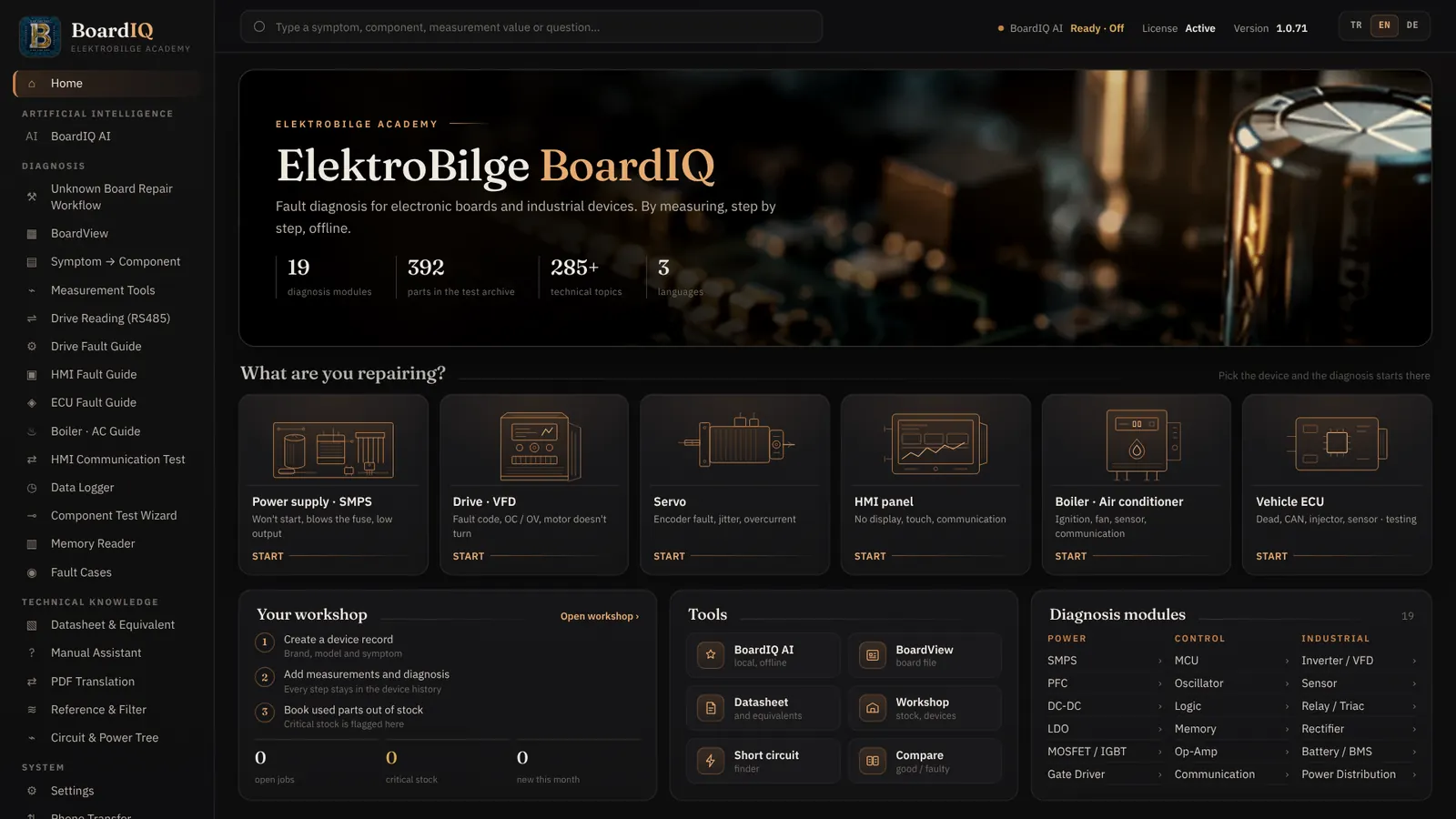
BoardIQ combines real board data, your measurements, component information and technical documents in one workspace. Local AI, BoardView and reference measurements help you find faults with evidence, not guesses.
One-user license $129 · one-time payment · no subscription
A REAL EXAMPLE · SMPS POWER SUPPLY
Measure. Enter. Decide.
The device is dead. BoardIQ tells you what to measure, where and on which range. You enter the reading, BoardIQ evaluates it and shows the next step.
Measure the right point
Pick the symptom. BoardIQ shows the test point, multimeter range and probe connection, and warns you about high-voltage areas.
Type in the real reading
Example: AC input 230 V, bulk capacitor 180 V DC. BoardIQ does not assume a fixed value; it calculates the expected value from your own input measurement.
See the result and next step
“AC input present, bulk DC missing or very low.” Fuse, NTC, EMI filter and bridge rectifier are checked in order. Every reading is added to the evidence summary as PASS / FAIL.
SCREENSHOTS FROM THE SOFTWARE
See BoardIQ up close.
All screenshots are taken from the current English version of BoardIQ. The focus is industrial electronics: drives, HMIs, oscilloscope and memory.
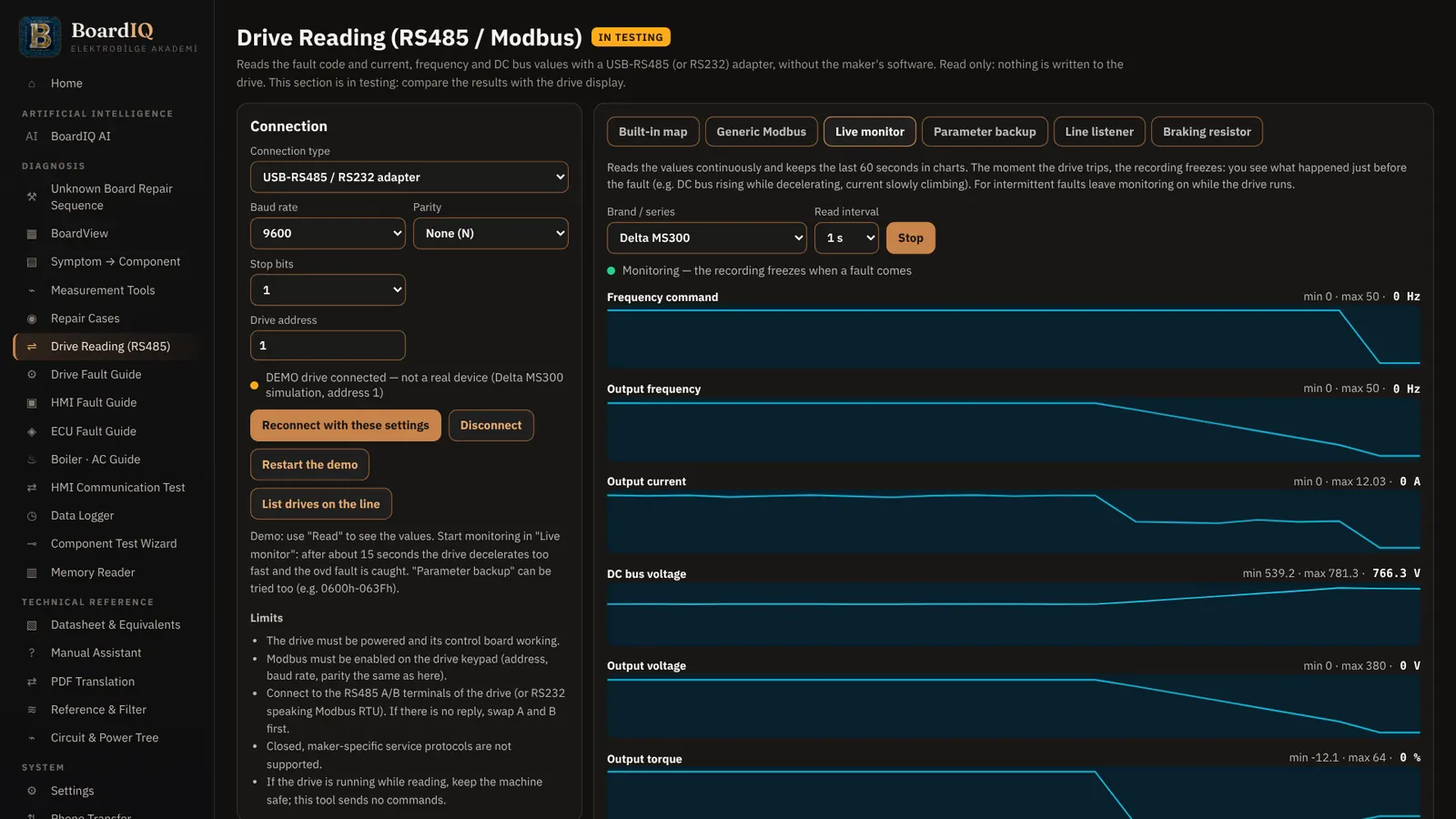
RS485 / MODBUS DRIVE READING
See what happened just before the fault.
Connect with a USB-RS485 adapter, without the manufacturer software. Live monitoring keeps the last 60 seconds on charts and freezes the recording the moment the drive trips: the DC bus rising during deceleration, the current creeping up.
- Ready maps for Delta, Siemens (incl. V20), LS ELECTRIC, Schneider, Yaskawa
- Status, fault code, frequency, current, DC bus, temperature
- Generic Modbus for any register
- Read-only: it never writes to the drive

PARAMETER BACKUP
Back up parameters by machine name.
Store drive parameters with machine and model name. Compare two backups, or a backup with the drive’s current state; every differing parameter is listed.
- Backup comparison and save to file
- Modbus line sniffing and drive list
- Brake resistor calculator and demo mode

VFD AND SERVO FAULT GUIDE
From fault code to faulty section.
Step-by-step flows for OC, OV, UV, OH and no power-up: what to measure, in which mode, powered or not. A clickable board map shows what each part does, how to test it and how it fails.
- Power board: rectifier, precharge, DC bus, IGBT / IPM, gate driver
- Control board: processor / EEPROM, I/O, communication, encoder
- Brand-independent, compares the phases with each other
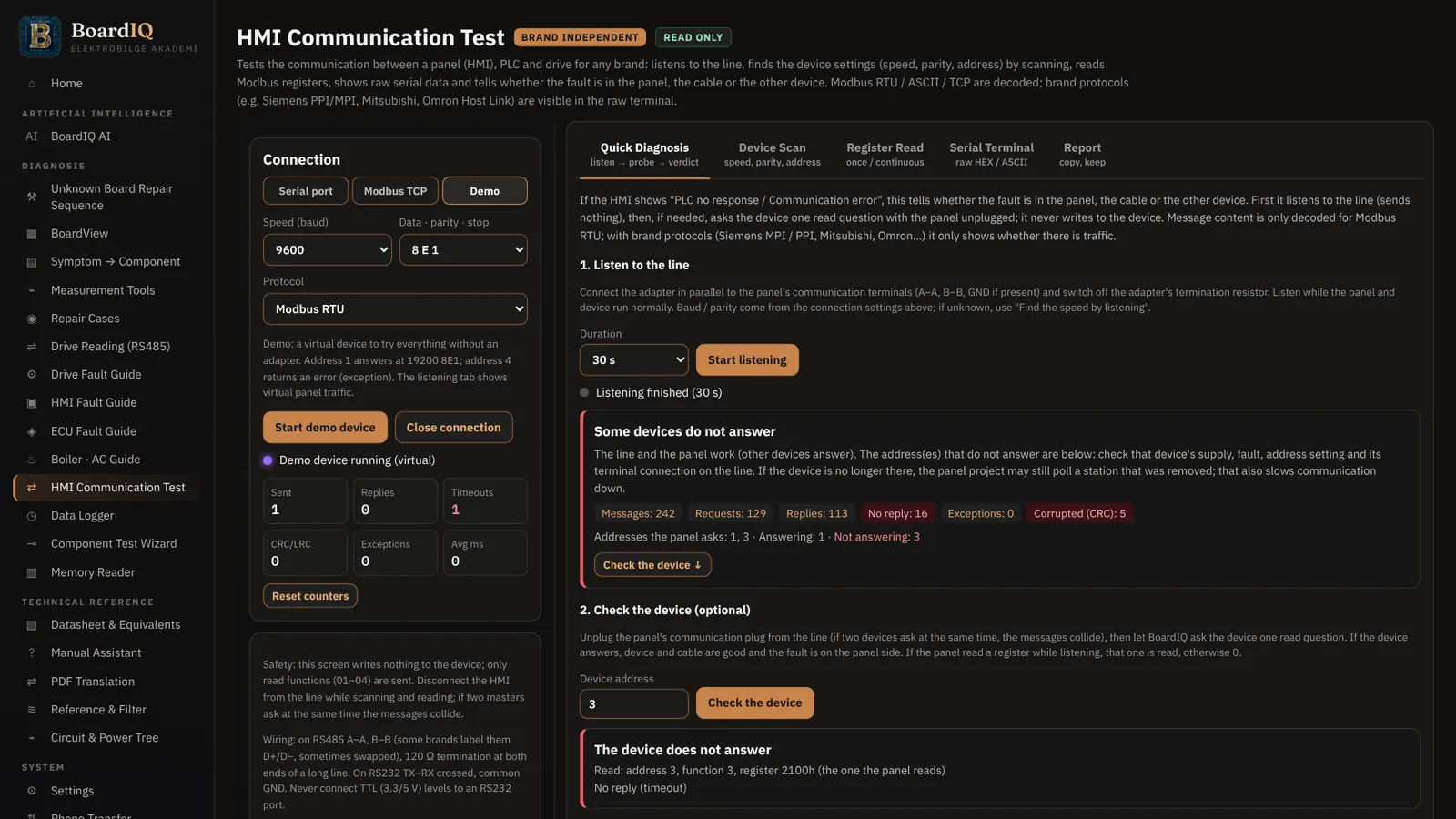
HMI TEST AND FAULT GUIDE
Panel, device or cable?
Listen to and query the line between HMI and PLC / drive. The HMI fault guide and board map narrow down black screen, backlight, touch and communication faults step by step.
- RS485 line sniffing and query
- HMI board map: DC-DC, LED driver, processor, touch
- Bench test and backup guide

OSCILLOSCOPE ANALYSIS
Make sense of a scope recording.
Open Rigol, Keysight, Tektronix, Siglent and generic CSV / TXT recordings with all channels. Find the problem area in gate, PWM and switching signals.
- Cursors, frequency, duty, RMS, edge times
- FFT / spectrum analysis
- Comparison with reference waveforms
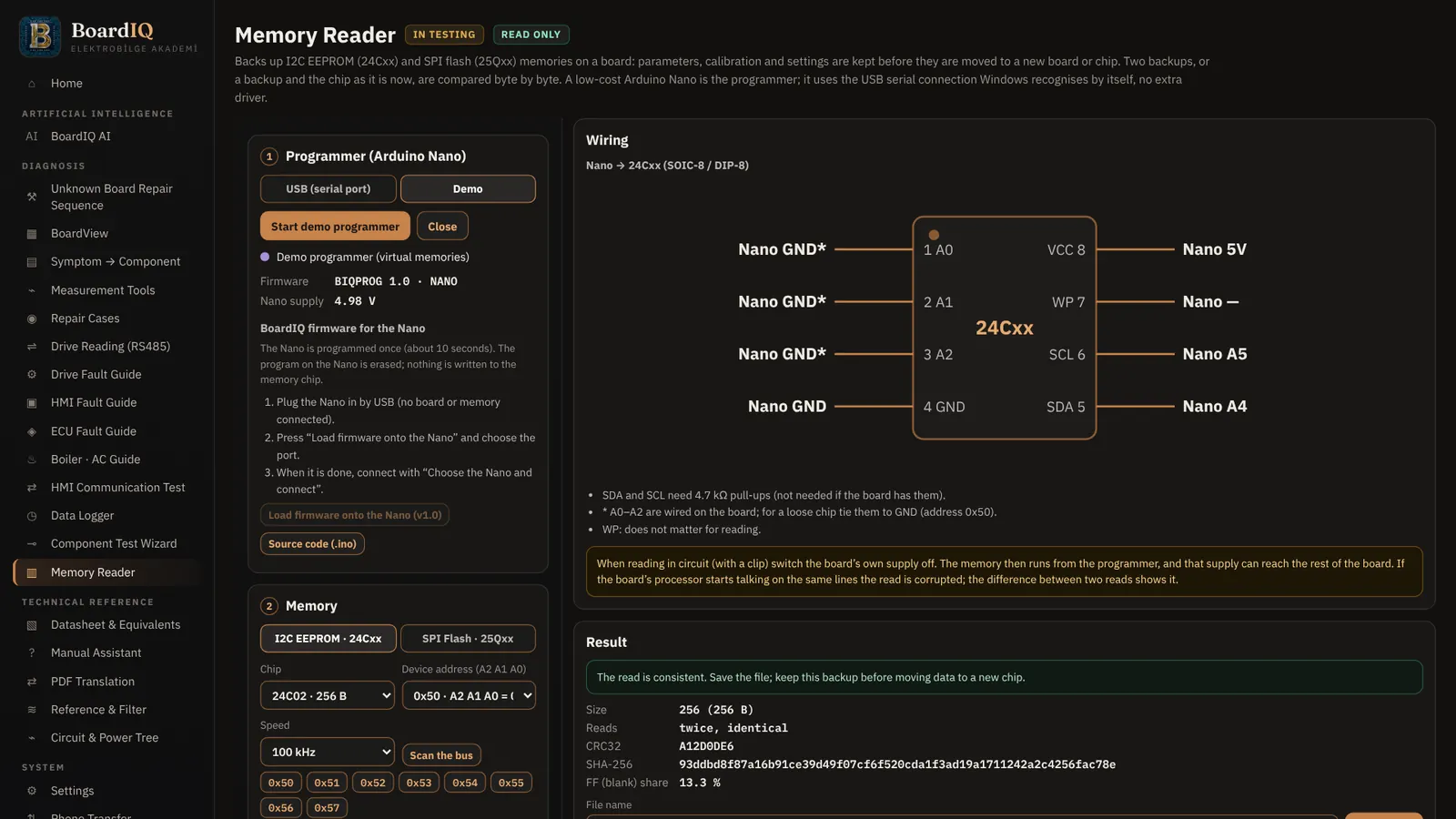
EEPROM / FLASH MEMORY READER
Secure the memory before replacing a board.
Read and back up unprotected I²C / SPI EEPROM and SPI flash memories with an Arduino Nano. Two reads are compared and verified with CRC and SHA-256.
- 24Cxx and 25Qxx memories
- Bus scan, read, verify, save to file
- Never writes to the memory; read-only
WHO IS IT FOR?
For everyone who repairs boards.
BoardIQ is built for people who work with a meter in hand and want to be sure before replacing a part.
Repair technicians
Narrow down faults on TV, SMPS, mainboard and appliance boards by measurement and avoid unnecessary part swaps.
Service centers
Diagnostic sessions, device records and stock tracking build your workshop’s own fault archive.
Students and trainers
Learn board repair systematically with the multimeter and oscilloscope labs and explained repair steps.
Industrial maintenance
Decide faster on inverter, PLC, drive and power boards with test point guidance and datasheet support.
SYSTEM REQUIREMENTS
Your workshop PC is enough.
BoardIQ’s diagnostic modules are lightweight. Only the optional local AI needs more memory.
| Operating system | Windows 10 / 11 (64-bit) · macOS (Apple Silicon M1–M4 and Intel) · Linux (64-bit AppImage) |
|---|---|
| Memory (RAM) | 4 GB minimum · 8 GB or more recommended |
| BoardIQ AI (optional) | Mini: 4 GB RAM · Lite: 8 GB RAM · Standard: 16 GB RAM and 8 GB GPU memory |
| Disk space | About 1 GB for the program · extra space for the AI pack depending on profile |
| Internet | For installation, license activation and updates. Diagnostic modules work offline; BoardIQ runs 30 days without a connection. |
| Languages | English · Deutsch · Türkçe |
TRY IT FIRST
3-day free trial
Download BoardIQ and try it on your own computer with your own boards. If you like it, buy a license and activate it in the same installation.
BoardIQ is now on the Microsoft Store: safe installation and automatic updates. All features are free for the first 3 days.
One-user license, can be activated on 2 computers.
LICENSE
Bring measurement-based diagnosis to your workshop.
Use local AI, BoardView, datasheet and equivalent research, reference measurements and diagnostic records in one electronics repair workspace.
- Windows, macOS and Linux
- Activate on 2 computers
- 3-day free trial
- Offline diagnostic workflows
- Measurement and workshop tools
- Diagnostic archive and export
Taxes and payment options are shown at checkout.
FAQ
About BoardIQ.
Which computers does BoardIQ run on?
Windows 10 / 11 (64-bit), macOS (Apple Silicon and Intel) and Linux (64-bit). See the system requirements above.
Do I need an internet connection?
Only for installation, license activation and updates. Diagnostic workflows and tools work offline, and BoardIQ runs for 30 days without connecting.
Does BoardIQ measure the board automatically?
No. You measure with your own instrument and enter the values. BoardIQ compares them with references and guides you to likely faults and the next verification step.
Can I save my diagnoses?
Yes. Save diagnoses with brand, model and notes, and export them to build your own repair archive.
Is there a free trial?
Yes. Download BoardIQ from the download page and use it free for 3 days. After purchase, enter your license key in the same installation.
How much does BoardIQ cost?
A one-user license costs $129 as a one-time payment, no subscription. Checkout is handled securely by Polar.
On how many computers can I use the license?
The license can be activated on 2 computers, for example your workshop PC and your laptop.
Do I need a powerful computer for the AI?
No. BoardIQ AI detects your hardware and recommends a suitable profile. The Mini profile runs with 4 GB RAM; stronger computers can use larger models. All diagnostic modules also work without AI.
More questions? info@elektrobilge.com